
Introduction
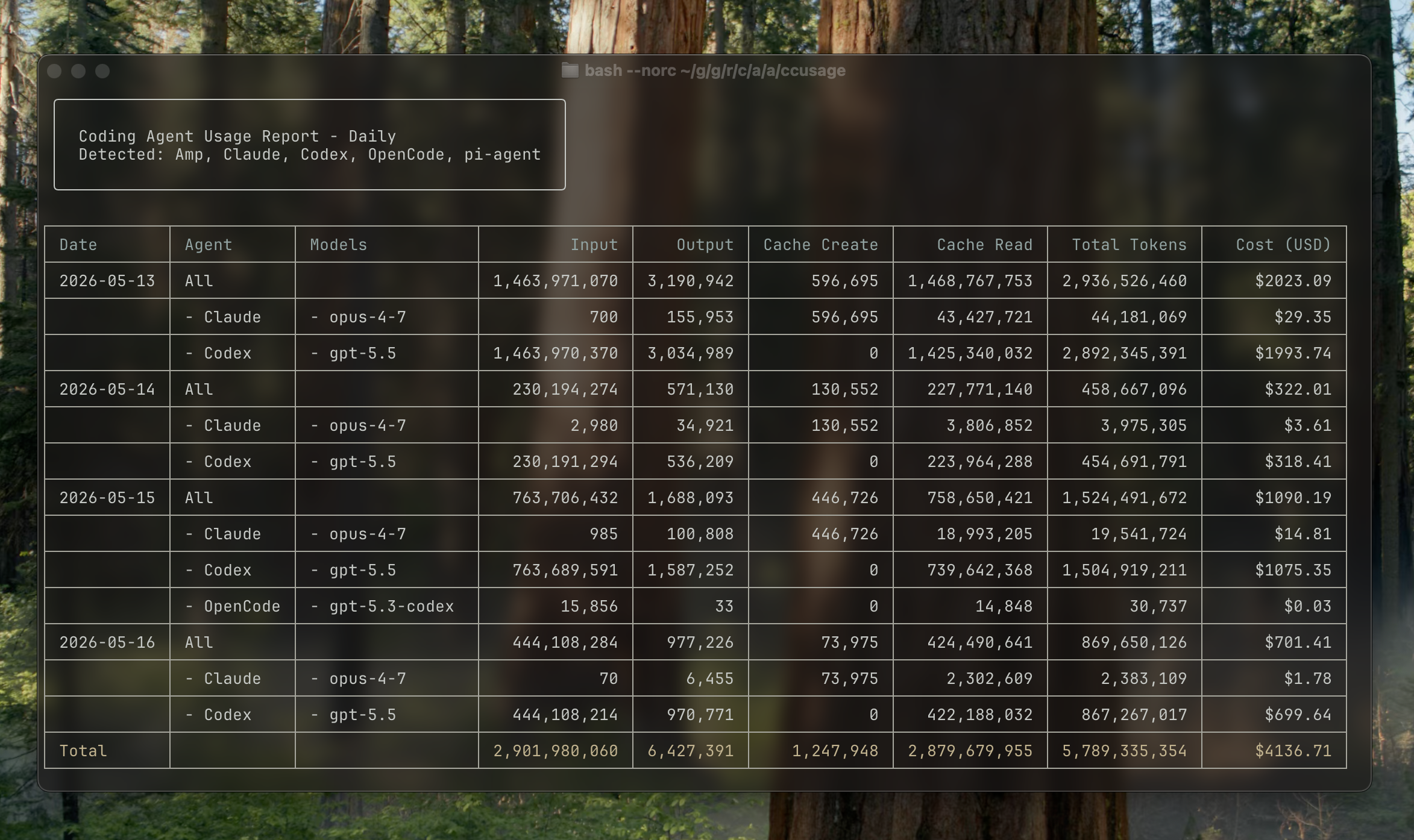
ccusage is a local CLI for understanding coding (agent) CLI token usage and estimated costs across Claude Code, Codex, OpenCode, Amp, Droid, Hermes Agent, pi-agent, Goose, OpenClaw, Kilo, Kimi, GitHub Copilot CLI, and Gemini CLI.
The original “cc” came from Claude Code usage and now also fits Codex CLI usage. As OpenCode, Amp, Droid, Hermes Agent, pi-agent, Goose, OpenClaw, Kilo, Kimi, Gemini CLI, and other coding (agent) CLIs became part of the same workflow, ccusage expanded into a general name for local coding CLI usage analysis.
The Problem
Modern coding (agent) CLI usage is split across several local data formats. That makes basic questions hard to answer:
- How much am I actually using each coding CLI?
- Which conversations are the most expensive?
- What would I be paying on a pay-per-use plan?
- Which projects, sessions, or weeks are driving usage?
The Solution
ccusage reads the local usage files that coding CLIs already generate and provides:
- All Sources by Default - Claude Code, Codex, OpenCode, Amp, Droid, Hermes Agent, pi-agent, Goose, OpenClaw, Kilo, Kimi, GitHub Copilot CLI, and Gemini CLI in one CLI
- Usage Views - Daily, weekly, monthly, and session-based breakdowns
- Cost Analysis - Estimated costs based on token usage and model pricing
- Focused Data Source Views - Start with all detected sources, then narrow the same usage views to one source when needed
- Data Source Pages - Source-specific setup and extra features live with each supported data source
- Multiple Formats - Beautiful tables or JSON for further analysis
How It Works
- Coding CLIs generate local usage files containing usage data
- ccusage reads these files from your local machine
- Analyzes and aggregates the data by date, session, or time blocks
- Calculates estimated costs using model pricing information
- Presents results in beautiful tables or JSON format
Key Features
🚀 Direct Execution
You can run ccusage without a global install using bunx ccusage (recommended), pnpm dlx ccusage, or npx ccusage@latest.
📊 Usage Views
- All Sources (Default) - Aggregates every detected supported source
- Daily Usage - Usage aggregated by calendar date
- Weekly Usage - Usage aggregated by week with configurable start day
- Monthly Usage - Monthly summaries with trends
- Session Usage - Per-conversation analysis
💰 Cost Analysis
- Estimated costs based on token counts and model pricing
- Support for different cost calculation modes
- Model-specific pricing across supported providers
- Cache token cost calculation
Data Source Pages
Each data source page covers the details that only apply to that source, including custom directories, pricing notes, and source-specific commands.
🔧 Flexible Configuration
- JSON Configuration Files - Set defaults for all commands or customize per-command
- IDE Support - JSON Schema for autocomplete and validation
- Priority-based Settings - CLI args > local config > user config > defaults
- Environment Variables - Traditional configuration options
- Custom Date Filtering - Flexible time range selection and sorting
- Offline Mode - Cached pricing data for air-gapped environments
Data Sources
ccusage reads from local coding CLI data directories:
| Agent | ID | Default data location |
|---|---|---|
| Claude Code | claude | ~/.config/claude/projects/, ~/.claude/ |
| Codex | codex | ${CODEX_HOME:-~/.codex} |
| OpenCode | opencode | ${OPENCODE_DATA_DIR:-~/.local/share/opencode} |
| Amp | amp | ${AMP_DATA_DIR:-~/.local/share/amp} |
| Droid | droid | ${DROID_SESSIONS_DIR:-~/.factory/sessions} |
| Hermes Agent | hermes | ${HERMES_HOME:-~/.hermes}/state.db |
| pi-agent | pi | ${PI_AGENT_DIR:-~/.pi/agent/sessions} |
| Goose | goose | Standard Goose data roots or GOOSE_PATH_ROOT |
| OpenClaw | openclaw | ${OPENCLAW_DIR:-~/.openclaw} |
| Kilo | kilo | ${KILO_DATA_DIR:-~/.local/share/kilo} |
| Kimi | kimi | ${KIMI_DATA_DIR:-~/.kimi} |
| Copilot CLI | copilot | ~/.copilot/otel/*.jsonl |
| Gemini CLI | gemini | ${GEMINI_DATA_DIR:-~/.gemini/tmp} |
The tool automatically detects available data and aggregates all supported coding CLIs by default. Each source-specific environment variable can also contain comma-separated directories, which lets unified reports combine current profiles and archives.
Report Shape
Run ccusage without a source name to aggregate all detected sources:
ccusage daily
ccusage weekly
ccusage monthly
ccusage session
Add a data source namespace when you want the same report focused on one source:
ccusage claude daily
ccusage codex daily --speed fast
ccusage opencode weekly
ccusage amp session
ccusage droid daily
ccusage hermes daily
ccusage pi monthly
ccusage goose daily
ccusage openclaw daily
ccusage kilo daily
ccusage kimi daily
ccusage copilot daily
ccusage gemini daily
Use ccusage <source> <report> only when you want to narrow a report to one source.
For Claude Code-specific setup and features, start from the Claude Code data source page.
Privacy & Security
- 100% Local - All analysis happens on your machine
- No Data Transmission - Your usage data never leaves your computer
- Read-Only - ccusage only reads files, never modifies them
- Open Source - Full transparency in how your data is processed
Limitations
Important Limitations
- Local Files Only - Only analyzes data from your current machine
- Language Model Tokens - API calls for tools like Web Search are not included
- Estimate Accuracy - Costs are estimates and may not reflect actual billing
Acknowledgments
Thanks to @milliondev for the original concept and approach to Claude Code usage analysis.
Getting Started
Ready to analyze your coding (agent) CLI usage? Start with the Getting Started Guide.